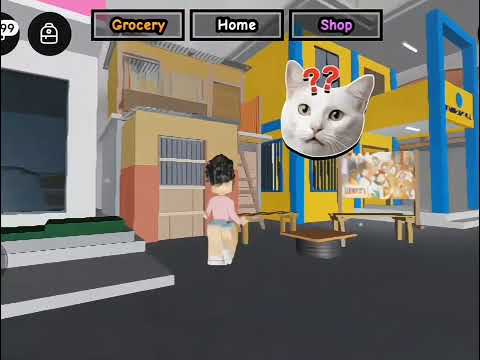
Upgrade your restaurant with equipment from the in-game Shop. Gameplay footage checked August 25, 2026 confirms store categories for Tables, Chairs, Stoves (labelled Basic, Standard, and Deluxe), Paints, and Materials. The Shop restock countdown timer controls shelf inventory, so verify current stock before planning major purchases.
Here is what was seen in public gameplay sessions when interacting with the in-game Shop.
Stoves
Basic Stove, Standard Stove, Deluxe Stove
Role in restaurant: Cook customer orders in the kitchen. Having multiple stoves allows preparing several meals concurrently during peak dining rushes.
Observed status: Models labelled Basic, Standard, and Deluxe were observed in Shop footage. Exact cooking duration multipliers and prices require in-game confirmation.
Tables & Chairs
Dining Tables, Customer Chairs
Role in restaurant: Provide customer seating. Arriving diners can only be seated and generate food orders when open table spots are available.
Observed status: Starter tables and chairs are placed during the opening tutorial. Additional furniture can be purchased from the Shop as restaurant funds grow.
Paints & Decor
Wall and Floor Paints
Role in restaurant: Customize the interior visual appearance and ambiance of your restaurant.
Observed status: Paints category displayed in store menus; aesthetic options rotate based on active store inventory.
Materials
Restaurant Building Materials
Role in restaurant: Used for restaurant structure setup and interior modifications.
Observed status: Listed under the Materials section in the in-game Shop; availability changes with restock cycles.
Restock cycle
How the in-game store inventory works
The store in Karinderya operates on a dynamic restock cycle shown in community gameplay:
Visible restock timer: The store displays a countdown until the next stock refresh. If an item you want is out of stock, check the timer rather than leaving permanently.
Rotating availability: Different tiers of stoves or furniture designs may appear during specific restock cycles.
Balanced spending: Avoid spending all cash on cosmetic paint early on if your restaurant needs additional stoves to clear customer queues.
Want to compare two observed equipment options under your own test conditions? Try our transparent option comparator tool. Surface changes such as wall paint are covered by the paint and wall colour checks in the design guide. Replaced a table, chair, or stove and want the Cash back? See the reported furniture resale route before you buy a replacement.
Where the shop actually is
Cross the street to reach the store
Your restaurant menu is not where furniture and surfaces come from. Walk out of the front door, cross the road, and the store counter is waiting.
Seen in gameplay · September 11, 2026
The shelf you will be staring at
Dated footage shows the counter NPC greeting players with two tips of its own: upgrading a stove speeds up cooking, and buying more tables serves more customers at once.
On the shop screen
What it is for
All / Tables / Chairs
Dining furniture that decides how many guests you can seat at once.
Stove
Kitchen units that let you cook more orders in parallel.
Paints / Materials / Tiles
Surface items you carry in your inventory and apply to walls, floors, and counters.
Next Stock countdown
The shelf rotation timer. Stock is limited per item, and a banner announces Shop has Restocked! when it refreshes.
A dated recording bought 1 Brick and 2 Marble in one visit, which is a useful expectation to set: high-demand surfaces come in small quantities, so a big renovation becomes several trips around the timer rather than one shopping spree.
Golden Spatula
Where the Golden Spatula is hidden
Two dated recordings from September 5, 2026 walk the same route and show the same purchase window, so this is screen evidence rather than hearsay.
01
Start at Grocery and look at the building beside it
One recording clicks the Grocery button in the top HUD to travel there; the other walks. The target is the building next door: its door lintel reads BARANGAY HALL in one recording, which is the landmark worth memorising.
02
Climb a bench and a wooden ladder onto the roof
Both recordings step onto a bench and follow a wooden ladder up to the second-floor metal roof, then run along the narrow outer edge and turn the corner. This is the part that eats attempts, because the creator slips off more than once.
Shortcut: one recording skips the roof lap by circling to the narrow alley behind the building and jumping at the wall corner to reach the same opening from below.
03
Drop through the plank opening into the hidden room
The roof platform holds a plank opening with a vertical ladder going down into a closed lower room. Inside stands the shop NPC — the nameplate reads Golden Perla in one recording and Golden Perlo in the other — with a Purchase! prompt. The room's own wooden door is shut and does not open from the inside.
04
Read the window before you commit
Both recordings show the same panel: a countdown in the corner, the item listed as Golden Spatula???, a price of ₱350,000, and a Purchase button. One player held only ₱95,669 and could not afford it; the other completed the purchase, the game answered You got the Golden Spatula!, and the tool landed in the hotbar where it can be equipped and swung.
Observed in both recordings
Supported by the screen
The route from Grocery up to the hidden room, including the roof edge and the downward ladder.
The item name Golden Spatula??? and the ₱350,000 price tag.
A completed purchase, with the spatula appearing in the hotbar.
Not shown
Do not assume these
What the spatula does. No cooking bonus, sale bonus, or stat appears in either recording.
What the countdown on the purchase window means, or how long the offer stays up.
Whether the shut door can be opened from the far side.
Watch the purchase
The recording that could afford it
Forty-seven seconds from Grocery to the hidden room, ending with the confirmation banner.
Dated recording — September 5, 2026
Grocery, roof, hidden room, purchase
Watch for: the Grocery button click, the bench and ladder climb onto the roof, the plank opening, the purchase window at the countdown, and the banner that follows a successful buy.
Fact Boundaries
Confirmed equipment facts vs unconfirmed stats
We keep equipment documentation honest and grounded in verified observations.
Confirmed & Observed
What is verified
The Shop features categories for Tables, Chairs, Stoves, Paints, and Materials.
Stove labels for Basic, Standard, and Deluxe models appear in gameplay menus.
Store shelves use an active restock countdown timer.
Tables and chairs are required to seat diners and receive meal orders.
Not confirmed yet
Unconfirmed details
Exact purchase costs or resale values for each stove tier.
Official cooking speed seconds or percentage multipliers per stove model.
Universal equipment tier lists claiming objective meta rankings.
Quick answers
Frequently asked questions
What equipment categories are available in Karinderya?
In gameplay footage checked August 25, 2026, the in-game Shop displayed categories for Tables, Chairs, Stoves, Paints, and Materials, subject to server inventory and restock timers.
What stove models have been observed in gameplay?
Store footage shows stove options labelled Basic, Standard, and Deluxe. Specific cooking speed differences, output stats, and exact purchase prices are not confirmed in official notes and require in-game verification.
Is there a chiller or refrigerator mechanic in Karinderya?
No chiller appliance mechanics, ingredient cooling rates, or cold-storage formulas are confirmed in official information or dated gameplay reviews.
Where do you buy tables, chairs, and paint?
Furniture and interior items are purchased from the in-game Shop during open store hours. Check your server's current stock and restock countdown before visiting.
Where is the Golden Spatula in Karinderya?
Two dated recordings from September 5, 2026 both start at Grocery and then climb the building beside it, whose door lintel reads BARANGAY HALL in one recording. The route steps onto a bench, follows a wooden ladder to the second-floor metal roof, runs along the narrow outer edge, and drops through a plank opening with a vertical ladder into a closed room. The shop NPC stands inside with a Purchase! prompt.
How much does the Golden Spatula cost in Karinderya?
Both recordings show a purchase window listing Golden Spatula??? at a cost of ₱350,000 with a Purchase button and a countdown in the corner. One player could not afford it with ₱95,669 in hand; the other completed the purchase and the game answered You got the Golden Spatula!. What the item does after you own it is not shown in either recording.