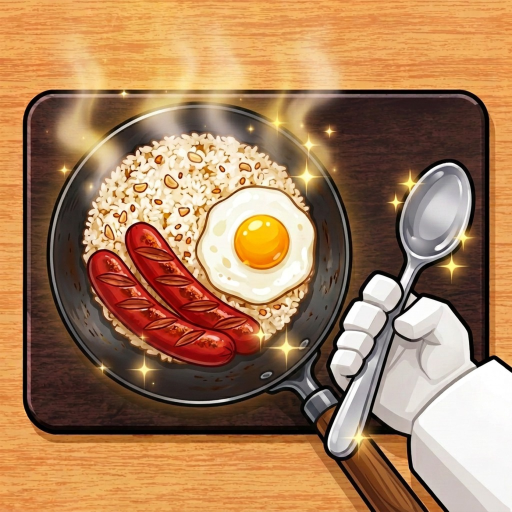
Compact Starter (1 Stove, 1 Table)
Try keeping your starting dining table close to the stove and leave a clear, unblocked path to the entrance as a planning starting point, not an official best layout.
Design Ideas & Layouts
Explore Karinderya Roblox design ideas and small plot layouts before spending in-game cash. Use the in-game Shop and customization prompts to place tables, stoves, tiles, and colors. This guide outlines practical compact arrangements and troubleshooting steps while keeping facts separated from unverified unlock rules.
Checked November 6, 2026
Design Ideas
Starter planning ideas to help you test walking distance and see how your service flow feels in a server.
Try keeping your starting dining table close to the stove and leave a clear, unblocked path to the entrance as a planning starting point, not an official best layout.
Consider positioning two dining tables near your cooking station with a clear route to the grocery shop, leaving an open path to test how your restock and service routine holds up.
Draft your custom table, stove, and door locations on a 9×8 grid using the Layout Designer to check your facility checklist before committing in-game cash.
Test your earnings per minute after making layout changes in Profit Lab to verify whether an extra table or stove actually improved your shift.
Scope
Player questions around Karinderya customization include tiles and colors, a second floor, paid furniture that is hard to locate, and what to do with unwanted items. These are related tasks, but they do not justify inventing a shared unlock rule.
The decorations guide covers Phone mystery-box ordering and table decoration slots. This page focuses on the restaurant structure, furniture handling, and “where did my item go?” checks.
Second floor
What dated gameplay shows about the upstairs dining area, and where the evidence stops.
Observed
Source: dated public gameplay by Berlian kecil (September 13, 2026), recorded as a dated observation rather than an official patch note.
Paint & wall color
What dated footage supports, and the shortest check you can run yourself.
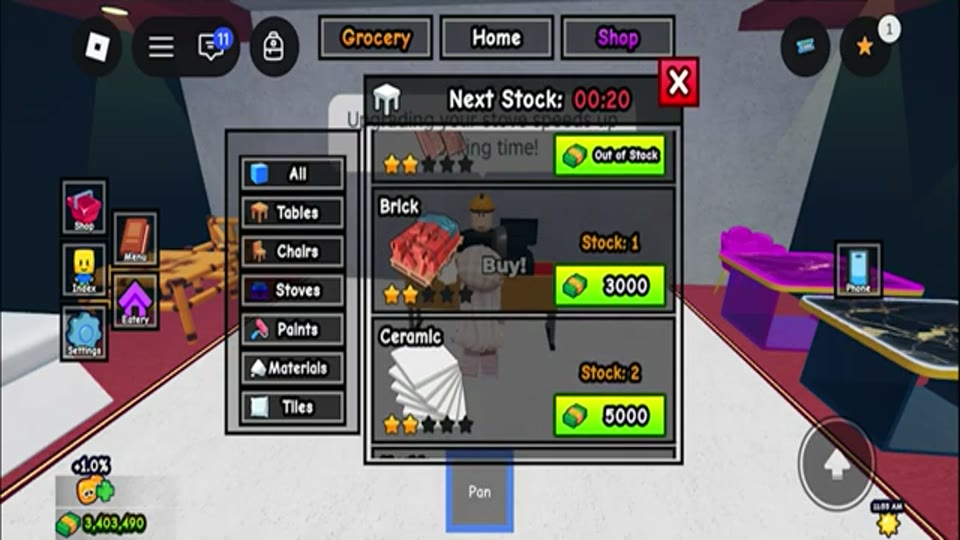
Walk out of your restaurant, cross the road, and open the shop counter. Its shelf tabs are All, Tables, Chairs, Stove, Paints, Materials, and Tiles, and a Next Stock countdown runs above the stock. Paint colours and materials such as Brick, Marble, Wood, Ceramic, Pebble, and Wood Plank appear as buyable items here. In the September 11, 2026 capture the Materials shelf read Brick 3,000, Ceramic 5,000, Marble 5,000 and Pebble 5,000, each with a stock count of one or two under a row of two filled stars.
Bought items land in your inventory, opened from the on-screen Search panel, and you move the one you want into a hotbar slot. Nothing changes in the restaurant until you equip it.
The change is an interaction, not a menu toggle: hold the item, look at the wall you want to change, and interact until the surface swaps over. The item is consumed as the texture appears. Tabletops work through the Table Customize menu with the material in hand, and that same menu carries a Remove control if you want to undo a placement.
Observed
Dated gameplay checked September 15, 2026 shows the full result, not just the menu: a player buys green paint for 1,000 and then paints a wall, which visibly turns green. A second dated recording from the same week has two players discussing painting their restaurant, including the outside, as unfinished work. A third recording from the same period shows where those surface items come from and how they are applied: the store across the street from your restaurant lists All, Tables, Chairs, Stove, Paints, Materials, and Tiles with a Next Stock restock countdown above the shelf, which matches the Paints category seen in Shop footage checked August 25, 2026 and recorded in the equipment guide.
Bought surface items go into your inventory and onto a hotbar slot, and the change itself is an interaction rather than a menu toggle: holding the item and interacting with the target wall block replaces its surface and consumes the item (a Brick turned a blank exterior wall section into brick in the dated recording). Tabletops work through the Table Customize interaction with a material such as Marble. The table Customize menu also shows a Remove control, so a placement can be undone.
What is now settled is the currency: buying one Brick for 3,000 moved the same Cash counter in the corner from ₱3,403,490 to ₱3,400,490, so a shelf tag spends restaurant Cash and not a separate shop currency. What is still not established: whether floors and counters are priced separately from walls, whether one item always covers one wall area, whether a named Paint item and a building material share the exact same interaction, and whether any surface choice changes rating, tips, or earnings in a documented way.
Watch it happen
The first shows the store, the inventory and a wall being changed. The second shows the Customize menu you meet at a table.
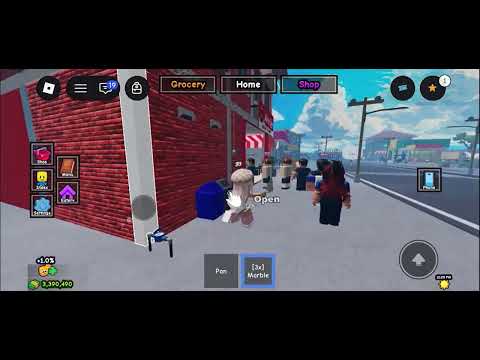
Dated recording — September 11, 2026
What to watch: the inventory holding paints and materials, the street store tabs at 00:23–00:38, and a blank wall turning into brick at 00:57–01:03. Marble changes a tabletop at 01:24–01:26.
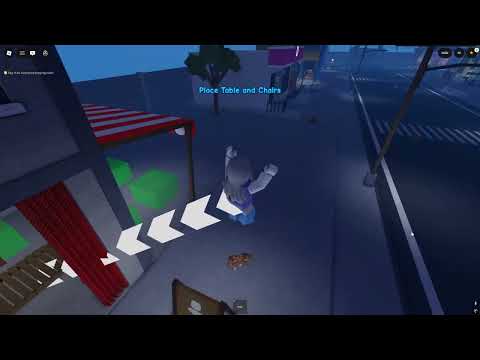
Dated recording — September 12, 2026
What to watch: the CUSTOMIZE panel at 00:20–00:22 with Tables, Chairs and Decoration 1–3 slots, plus the Remove button along the bottom.
Customize
Two entry points cover almost everything players call “customizing”: the furniture shop, and the panel you open at a table.
Observed
Dated recordings checked September 15, 2026 show the CUSTOMIZE panel opening from a dining table, with a sidebar of Tables, Chairs, and Decoration 1, 2, and 3, plus a red Remove control along the bottom. Furniture itself is bought at the store across the street, and table surfaces change through the same menu with a material in hand.
Still unverified: whether any decoration or surface choice changes customers, tips, or the star rating, and whether slot counts increase with restaurant upgrades.
Signage
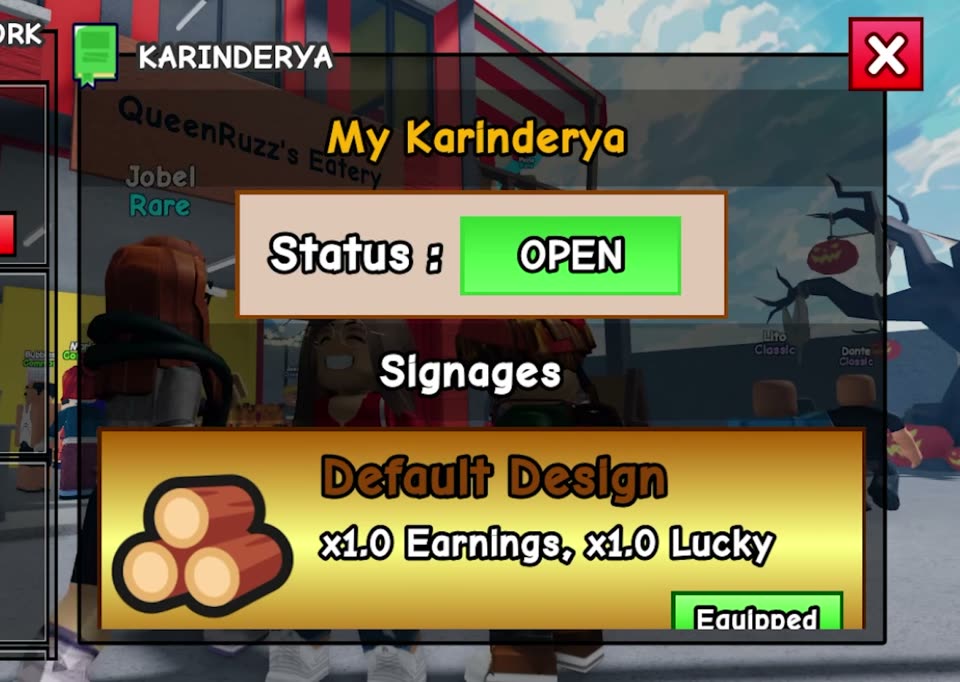
Paint, materials and tiles carry no effect line in the frames this site holds. The sign does: the My Karinderya panel writes its Earnings and Lucky values on the card, so a sign design is the one look you can compare by a number.
A November 5, 2026 recording opens the My Karinderya panel: Status : OPEN, then a Signages section holding one card — Default Design, x1.0 Earnings, x1.0 Lucky, with a green Equipped button. So the sign is a design choice the panel scores explicitly, and the default look is the neutral one: neither multiplier is raised on a fresh restaurant.
The event shelf prices up the same idea. The Halloween set page records the Halloween Signage card writing x1.75 Earnings and x1.75 Lucky, which is why this page treats the sign as the exception to “decoration does not change numbers”.
Tiles & floors
Floor tiles come from the Tiles tab of the store across the street from your restaurant, and that shelf shares the same restock countdown as Paints and Materials. Tiles are numbered rather than named by pattern — the only tile this site has read off a shelf is Tile 15 — and no recording has opened the Tiles tab itself, so treat any full list you see elsewhere as unverified.
The store across the street from your restaurant lists Tiles alongside Paints and Materials, under the same Next Stock restock countdown. The Materials shelf in that capture also shows how rows behave: an item with stock left keeps its price button, an item at Stock: 0 replaces the price with an Out of Stock strip, and buying one Brick dropped the ₱ counter by exactly its 3,000 tag. For materials, the same recording shows the apply step: hold the item, face the target surface, and interact until the texture changes.
The counter sits across the road from your restaurant. Open it and look for the shelf tabs.
The Tiles tab sits beside Paints and Materials. Note the item names and the price shown on the shelf, and check the Next Stock countdown above it — that timer governs this shelf the same way it governs Paints and Materials.
Buying puts the tile in your inventory rather than onto the floor. Surface items in this game are carried items, so look for it in your hotbar or inventory before expecting it to appear on a surface.
Equip the tile, face the floor surface — or the counter, if you are changing that instead — and look for an interaction prompt. Materials in the same recorded flow are applied by interacting until the texture visibly changes.
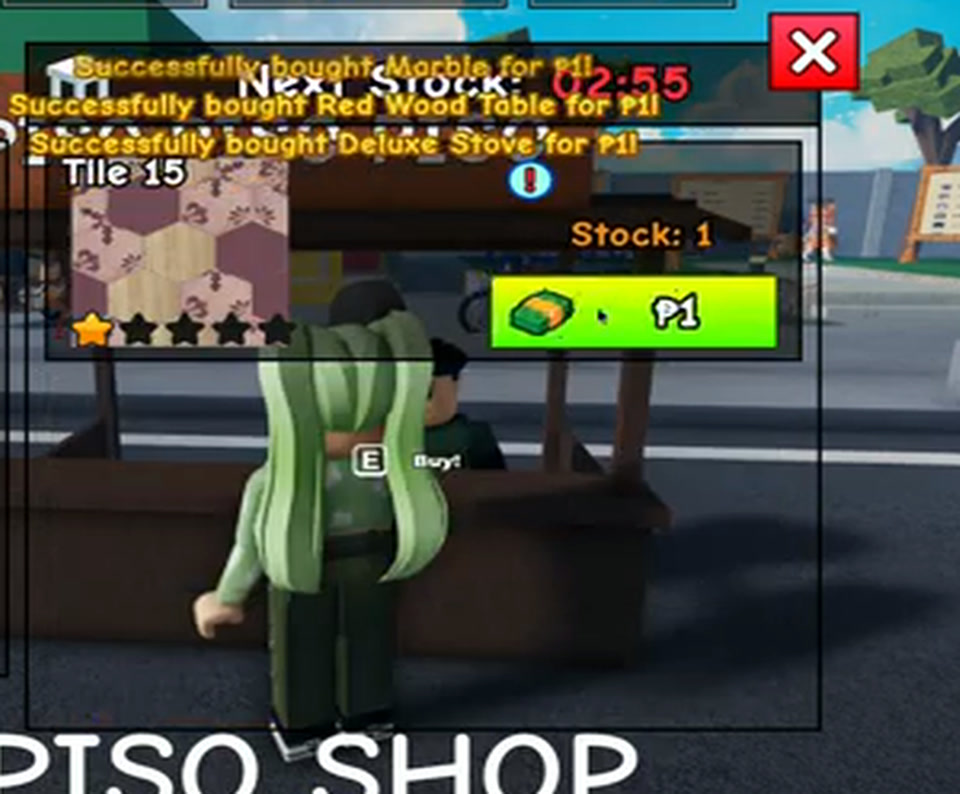
Tiles carry a number, not a pattern name. The September 26, 2026 recording reads a row labelled Tile 15 with one filled star of five, Stock: 1 and a ₱1 button in the street-side PISO PISO PISO stall, and buying it produced the message “Successfully bought Tile 15 for P1”. That is one observed name, not a catalogue: the six rows this capture read or bought were Red Wood Chair, Pastel Orange Paint, Marble, Red Wood Table, Deluxe Stove and Tile 15, and the player’s wallet fell from ₱54,286 to ₱54,280 across those six purchases, which is exactly ₱1 each. The panel scrolls, so treat that as what one cycle showed rather than a full stock list. The stall’s own panel carries the same Tiles category as the regular store, so the numbering is the same shelf family rather than a separate item type.
If the Tiles tab is empty: check the Next Stock countdown rather than leaving the store. The shop shelf rotates, so a missing tile is a stock state — the same behaviour the operations reference records for the rest of the shop. The ₱1 stall resets on a roughly three-minute countdown: in the September 26, 2026 capture it read 00:00 at 00:53, 03:00 at 00:54 and 02:57 at 00:55, so a missed tile costs you one cycle, not one day.
What this page will not guess: how many tile designs exist, the regular store’s tile prices, whether tiles are bought per floor area or per room, whether floors and counters are priced separately, and whether applying a tile consumes the item the way the material application does. No official source publishes any of those, so read the shelf price and the prompt in your own server before spending a large share of your restaurant cash.
Do not treat a tile as a stat purchase. A tile is a floor finish. Nothing observed shows a tile, paint, or material choice changing customer flow, tips, or star rating, so plan capacity with the progression route before spending on surfaces.
Task checklist
Use the prompt and category names shown by your current server.
Use the visible Shop, Phone, table Customize prompt, or other current-client control that matches the item you want to change. Labels and locations may change between updates.
Recorded gameplay has shown separate furniture categories such as tables, chairs, stoves, paints, and materials. Confirm the category and current stock in your own server before planning a purchase.
After purchasing or selecting an item, look for the current placement prompt and verify that the item appears in the intended restaurant area. A missing item is a troubleshooting state, not proof that an unlock failed.
If your client exposes paint, tile, or color controls, change one area and confirm the visible result. Exact options, prices, and requirements are not currently confirmed by an official source.
Second-floor availability has now been observed in dated gameplay, but the unlock condition and inventory location still need current-client verification. The table Customize menu does show a Remove control in dated footage, so a placement can be undone; whether removal refunds cash is not shown. Do not rely on an old clip for an exact cost, level, or resale value.
Status matrix
Troubleshooting
Return to the current Shop or customization menu and confirm that the item name and category match. Stock may rotate.
Walk through the area where placement is expected and check the visible interaction prompt. Do not assume an old video’s location is permanent.
If the UI is missing or a prompt is stuck, rejoin a current public server as a generic retry. Record the exact message before reporting the issue.
Save the item name, category, server date, and what you saw. This helps separate an availability issue from an unverified unlock condition.
Quick answers
Dated gameplay checked September 13, 2026 shows a usable upper-floor area: the creator walked upstairs, found the floor ready, and still had to buy tables and chairs before the space could seat customers. The unlock order, cash cost, and any level or progress requirement are not published by SILOG, so read the prompt in your own server instead of budgeting from a community number.
Gameplay checked September 13, 2026 shows the creator buying wooden dining tables and matching chairs from the Shop for the upstairs seating area, with only a couple of units in stock for the item being purchased. Exact item names, prices, and restock behaviour still need current-client verification.
Open the current Shop or the table Customize prompt, choose the matching furniture, decoration, or surface category, place the item, and confirm the visible result in your own server. Paint, tile, and color options plus their prices are not published by SILOG, so record what your client shows before spending a large amount of restaurant cash.
Dated gameplay checked September 15, 2026 shows a player buying green paint for 1,000 and a wall visibly turning green, so paint is a real surface choice rather than a menu label. A separate recorded session shows the mechanism: surface items such as Brick, Marble, Wood, Ceramic, and the paint colours are bought from the store across the street (Paints, Materials, and Tiles tabs, with a Next Stock countdown), carried in your inventory, equipped to a hotbar slot, and applied by interacting with the target wall block, which consumes the item. Tabletops use the Table Customize interaction instead. Check whether the surface you are changing is a finished wall or an unfinished wall block, and confirm the visible change in your own server.
The dated evidence places paint items in the in-game Shop under a Paints category alongside Tables, Chairs, Stoves, and Materials, and the Shop restock timer controls what is on the shelf at any moment. If the item you want is missing, check the restock countdown rather than leaving permanently.
The store across the street from your restaurant lists a Tiles tab beside Paints and Materials under the same Next Stock countdown, so that is the shelf to check first. Buying puts the tile in your inventory as a carried item, not onto the floor, and the same Next Stock countdown that governs Paints and Materials governs this shelf — so an empty Tiles tab is a stock state, not proof that tiles were removed.
Open the street store, open the Tiles tab, read the item name and the price on the shelf, buy the tile, then equip it from your inventory and face the floor surface to look for a placement prompt. Materials in the same recorded flow are applied by holding the item against the target surface and interacting until the texture visibly changes, so that is the behaviour to test on a floor or counter in your own server. How many tile designs exist, whether tiles are bought per floor area or per room, whether floors and counters are priced separately, and whether a tile is consumed on placement are all unpublished, so read the shelf and the prompt in your client instead of budgeting from a community number.
Tiles are labelled with a number instead of a pattern name. A recording published September 26, 2026 shows a street stall labelled PISO PISO PISO whose shelf carried a row reading “Tile 15”, with one filled star of five, Stock: 1 and a ₱1 button, and buying it printed “Successfully bought Tile 15 for P1”. That is one observed row on a ₱1 shelf, not a catalogue: the stall's own panel repeats the same All, Chairs, Tables, Stoves, Paints, Materials and Tiles categories as the main store, and no recording has opened the regular store's Tiles tab, so neither the full numbering range nor the regular tile prices are published here.
The sign does, and it says so on its own card. A November 5, 2026 recording opens the My Karinderya panel, which lists Status: OPEN and then a Signages section holding one card: “Default Design — x1.0 Earnings, x1.0 Lucky” with a green Equipped button. The Halloween Signage card read “x1.75 Earnings, x1.75 Lucky”, so the sign slot is the design choice that carries multipliers. Paint, tiles and materials show no effect line in any frame this site holds, so treat those as appearance. No frame shows a second sign design, its price, or the control that swaps them, so read your own Signages card before spending.